Overview
FormKiQ is an API-first document management platform that deploys into your own Amazon Web Services account. Use it as a turnkey document management system, or as a secure and scalable document layer behind your own applications.
Document management is at the core of most organizations, with numerous documents that need to be stored, tracked, managed and organized. FormKiQ is designed to be flexible, customizable and cost-effective, so you can add those capabilities without building document infrastructure from scratch.
Common use cases include document workflows in regulated industries such as healthcare, financial services, and the public sector, where teams need control over data residency, access permissions, audit trails, and retention. See Compliance, Data Residency, and Data Sovereignty and the Regulated Production Deployment Checklist for guidance on configuring and operating these deployments.
FormKiQ also suits companies seeking more control over their document infrastructure. Deploying in your own AWS account lets you choose regions, manage access and encryption keys, and set backup and retention policies. For example, companies serving customers in the European Union can choose an EU AWS region for primary document storage and assess where backups, replicas, and external integrations process data as part of their residency and sovereignty planning.
Read Choosing FormKiQ to see whether it fits your use case, or go straight to the Quick Start (AWS) to install it.
Key Features
- API-first and headless. Every capability is available through the FormKiQ API, with SDKs for Python, TypeScript and Java, and a CLI. The web UI is separate from the backend, so you can integrate with web applications, mobile apps and backend services. The React-based FormKiQ Web is included and serves as a reference implementation.
- Runs in your AWS account. Primary document content and metadata are stored in your AWS account. Configured external integrations may process or store data elsewhere. See Security.
- Serverless and scalable. FormKiQ is built on serverless AWS services, so it scales from the smallest team to the largest corporation and you only pay for what you use. See AWS Cost Planning.
- Structured metadata. Organize documents with attributes, schemas, and entities.
- Search and OCR. Find documents with search and extract text with OCR.
- Automation. Route and process documents with workflows, rulesets, and mappings.
- Add-on modules. Extend the platform with antivirus scanning, document generation, e-signature, single sign-on, and more.
- Business Solutions. Work with purpose-built experiences in FormKiQ Web, including Contract Management for agreements, reviews, signing, and lifecycle activity. Availability depends on your licensed offering and configuration.
Feature availability depends on your edition and installed modules. See Core Concepts & Features and Modules & Commercial Offerings for the full list.
Deployment
FormKiQ deploys into your AWS account using AWS CloudFormation templates, giving you full control of your documents. Because the infrastructure is defined as code, deployments are repeatable, and changes can be tracked and rolled back if necessary.
See the installation links for the supported AWS regions.
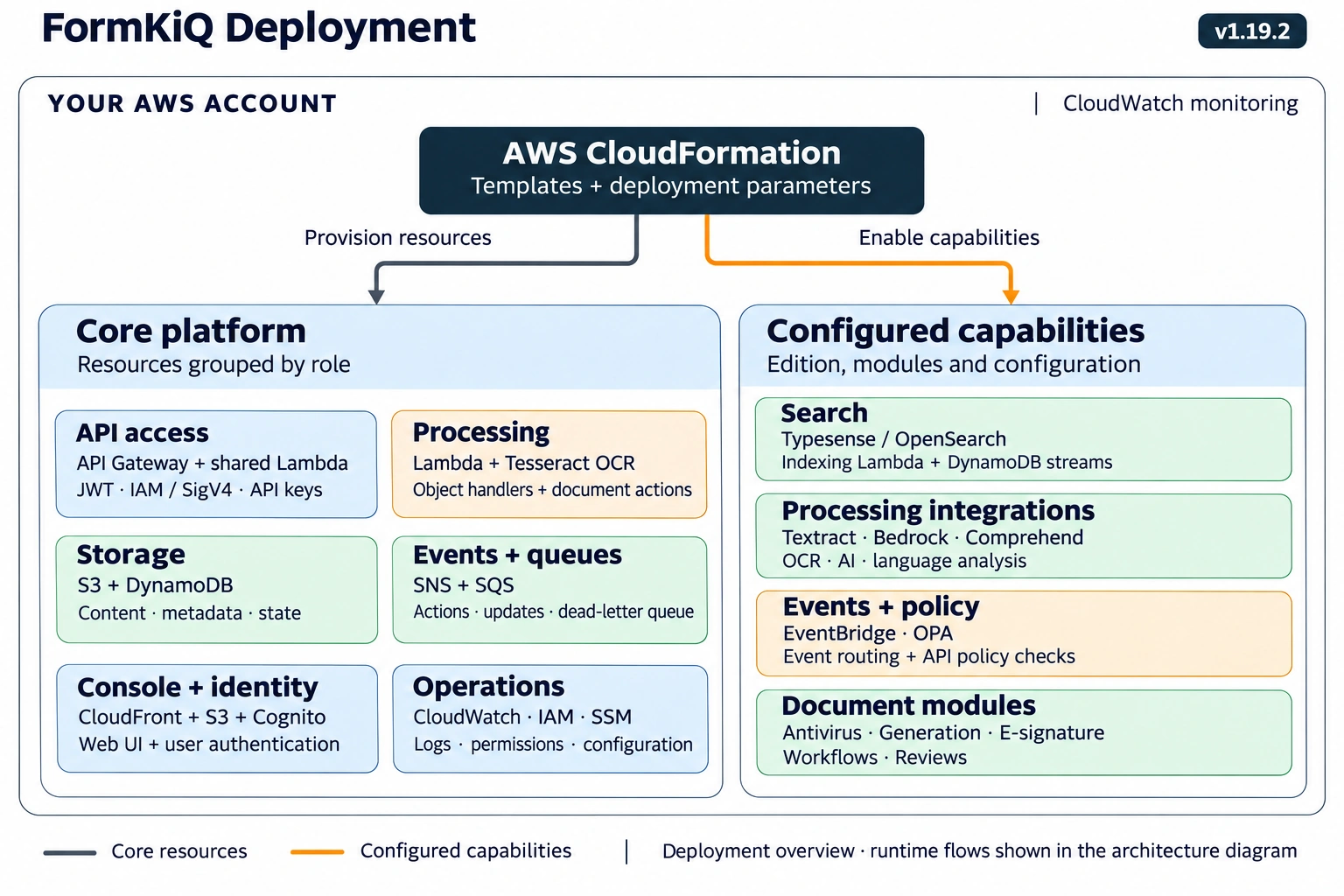
FormKiQ v1.19.2 deployment in text
AWS CloudFormation provisions FormKiQ v1.19.2 infrastructure in your AWS account using infrastructure-as-code templates and deployment parameters. Amazon CloudWatch provides monitoring. CloudFormation connects to two groups in the diagram:
- Provision resources: the gray connector (white in dark mode) leads to the core platform resources.
- Enable capabilities: the orange connector leads to capabilities enabled by the edition, installed modules, and configuration.
This is a deployment overview. The connectors show provisioning and configuration relationships; runtime flows are shown in the platform architecture diagram.
Core platform
Resources are grouped by role, in the same row-by-row order as the diagram. Each group can span multiple CloudFormation templates and resources.
- API access: Amazon API Gateway exposes JWT, IAM with Signature Version 4, and API key endpoints backed by a shared FormKiQ API Lambda. Amazon Cognito provides the default JWT identity service.
- Processing: AWS Lambda runs object handlers and document actions. Core OCR uses a Lambda processor with Tesseract; enhanced OCR integrations are configured separately.
- Storage: Amazon S3 stores document content. Amazon DynamoDB stores metadata, JSON attributes, cache, sync, and operational state. DynamoDB streams support configured search indexing.
- Events + queues: Amazon SNS publishes document and action notifications. Amazon SQS queues support document actions and object updates, with a dead-letter queue for failed processing.
- Console + identity: Amazon CloudFront and Amazon S3 deliver the Console web interface. Amazon Cognito manages user identity and authentication.
- Operations: Amazon CloudWatch provides logs and monitoring, AWS IAM roles and policies control service permissions, and AWS Systems Manager (SSM) Parameter Store holds deployment configuration and resource references.
Configured capabilities
Availability depends on the edition, installed modules, and configuration.
- Search: Typesense or OpenSearch provides search when configured. An indexing Lambda consumes DynamoDB streams to update the configured search engine.
- Processing integrations: Amazon Textract supports enhanced OCR, Amazon Bedrock supports AI processing, and Amazon Comprehend supports language analysis.
- Events + policy: Amazon EventBridge supports configured event routing, including commercial audit events. Open Policy Agent (OPA) adds API policy checks when enabled.
- Document modules: configured capabilities include antivirus scanning, document generation, e-signatures, workflows, and reviews.
The orange connector covers configured resources and integrations; it does not imply that CloudFormation creates managed AI services themselves. Availability depends on the edition, installed modules, and deployment configuration.
Architecture
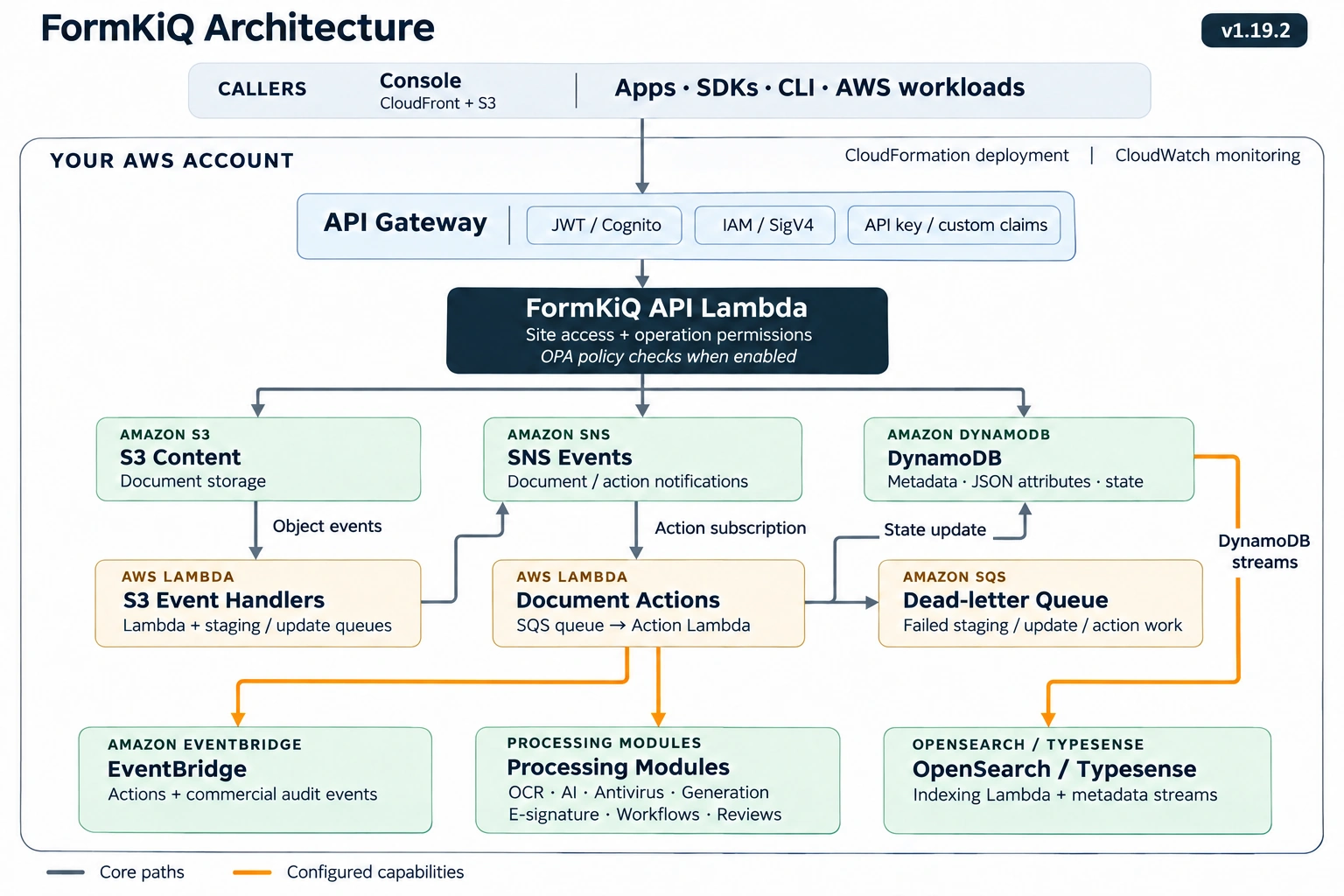
Platform architecture in text
FormKiQ v1.19.2 runs in your AWS account. AWS CloudFormation provisions the infrastructure, and Amazon CloudWatch provides monitoring and logs. The FormKiQ Console is served through Amazon CloudFront and Amazon S3. The Console, other applications, SDKs, FormKiQ CLI, and AWS workloads access the platform through the FormKiQ API.
API access and document processing
- Authenticate through Amazon API Gateway. Callers use a JWT endpoint with Amazon Cognito by default, an IAM endpoint with AWS Signature Version 4, or an API key endpoint supporting custom claims. All three invoke the same FormKiQ API Lambda.
- Authorize the operation. The API Lambda checks site access and operation permissions, with Open Policy Agent (OPA) policy checks when enabled.
- Store content and metadata. Amazon S3 stores document content. Amazon DynamoDB stores metadata, JSON attributes, and operational state. The API coordinates access to these stores and publishes document or action notifications through Amazon SNS.
- Handle object events. S3 object events trigger FormKiQ event handlers. Lambda functions and staging or update queues support ingestion and document-state updates. The handlers also publish events to SNS.
- Process document actions. An SNS action subscription sends work to an Amazon SQS queue. The action Lambda processes that work and updates document state in DynamoDB.
- Handle processing failures. Staging, update, and action work that exhausts its configured queue retries is sent to the SQS dead-letter queue for investigation and recovery.
Configured capabilities
- Amazon EventBridge: document actions can send events to EventBridge. The commercial platform also supports audit-event routing.
- Processing modules: configured features and modules support OCR, AI processing, antivirus scanning, document generation, e-signatures, workflows, and reviews.
- OpenSearch or Typesense: DynamoDB streams feed an indexing Lambda that updates the configured search engine. This indexing path is separate from the document-action queue.
The diagram's orange connectors identify configured capabilities; availability depends on the deployment, edition, and installed modules. This is a logical API view. See Document Storage for file-transfer details and Security for access-control configuration.
See the Platform Overview for the request flows, optional components, and diagram sources.
Licensing
FormKiQ is an open core product. The core document management functionality, FormKiQ Core, is available under an open source license. Additional document management functionality, add-on modules, professional services, and onboarding and operational support are available with the FormKiQ Essentials, Advanced, and Enterprise offerings. See Modules & Commercial Offerings or formkiq.com for details.
Support
For installation support, feedback, or updates:
- Join the FormKiQ Slack Community.
- Report bugs and request features through GitHub Issues.
Commercially licensed FormKiQ offerings have additional support options, including the FormKiQ Support Portal, Zoom sessions, and a private Slack channel.
Where to Go Next
- Choosing FormKiQ: decide whether FormKiQ fits your use case.
- Quick Start (AWS): install FormKiQ into your AWS account.
- API Walkthrough: make your first API calls.
- Platform Overview: understand the request flows and components.
- Tutorials: follow step-by-step examples.