FormKiQ CLI
Overview
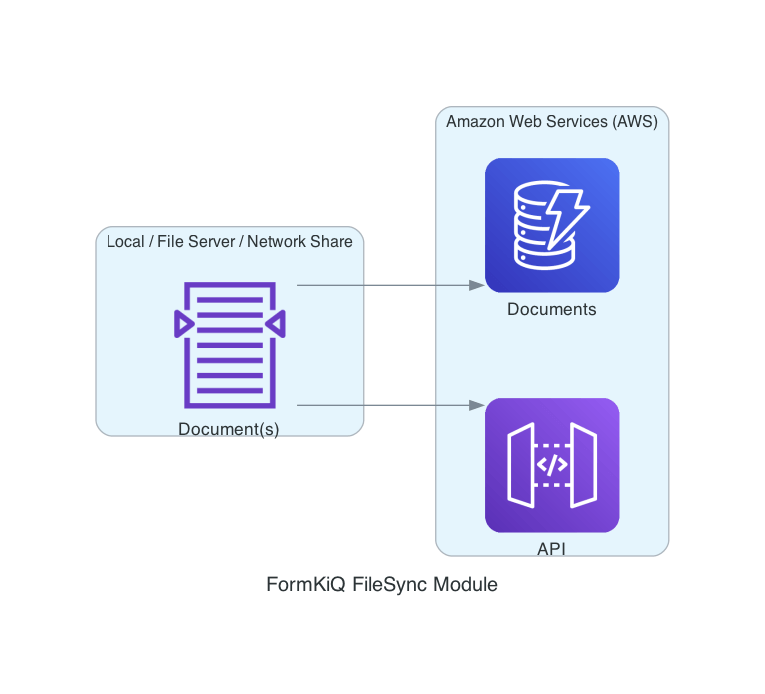
The FormKiQ CLI is a FormKiQ commercial module for moving files and document metadata into, between, and around FormKiQ environments.
Use it when you need to:
- Sync files from a local directory or S3 location into FormKiQ.
- Watch a local directory and upload new or changed files.
- Import documents, attributes, document content, document attributes, and site group permissions from CSV files.
- Export and import site configuration such as attributes, schemas, workflows, rulesets, mappings, locales, entity types, and entities.
- Copy FormKiQ document metadata between DynamoDB tables.
- Sync or verify migrated documents in OpenSearch.
- List, inspect, back up, and restore OpenSearch snapshots.
- List, delete, purge, or remove large sets of documents.
Before You Begin
Confirm you have:
- A FormKiQ Essentials, Advanced, or Enterprise installation.
- Access to the FormKiQ deployment's AWS account and Region.
- Access to the FormKiQ CLI GitHub releases.
- The FormKiQ
IamApiUrlandDocumentsTableNamestack outputs, or permission to let the CLI discover them from CloudFormation. - AWS credentials or an AWS profile with the permissions required for the workflows you plan to run.
Use an AWS profile or CloudShell role where possible. Static access keys are supported for older workflows but should be treated as deprecated.
Install the CLI
The FormKiQ CLI binaries are published as release assets in the public formkiq/formkiq-cli repository.
| Platform | Download |
|---|---|
| Linux | Download the Linux asset from the latest FormKiQ CLI release. |
| macOS | Download the macOS asset from the latest FormKiQ CLI release. |
| Windows | Download the Windows asset from the latest FormKiQ CLI release. |
CloudShell
Open AWS CloudShell in the same AWS account and Region as your FormKiQ deployment, then download the Linux release asset from GitHub. Copy the asset URL from the latest FormKiQ CLI release, then run:
curl -L -o formkiq-cli.zip "PASTE_LINUX_RELEASE_ASSET_URL"
unzip formkiq-cli.zip
chmod +x fk
After extracting the package, verify the executable:
./fk --help
Configure a FormKiQ Profile
Before using the CLI, configure a FormKiQ profile. Profiles are stored locally and contain the FormKiQ API URL, DynamoDB table name, Region, and AWS credential source.
CloudShell or AWS Role
Use this when your shell already has AWS permissions through an attached role:
fk --configure \
  --app-environment FORMKIQ_APP_ENVIRONMENT \
  --region AWS_REGION
AWS Named Profile
Use this when your workstation is already configured with the AWS CLI:
fk --configure \
  --aws-profile AWS_PROFILE \
  --region AWS_REGION \
  --app-environment FORMKIQ_APP_ENVIRONMENT
Static Credentials
Use static credentials only when an AWS role or named profile is not available:
fk --configure \
  --access-key ACCESS_KEY \
  --secret-key ACCESS_SECRET \
  --region AWS_REGION \
  --app-environment FORMKIQ_APP_ENVIRONMENT
Manual Configuration
If CloudFormation discovery is not available, provide the FormKiQ API URL and DynamoDB table name directly:
fk --configure \
  --access-key ACCESS_KEY \
  --secret-key ACCESS_SECRET \
  --region AWS_REGION \
  --iam-api-url IAM_API_URL \
  --documents-dynamodb-tablename DOCUMENTS_TABLE_NAME
Create a named profile with --profile:
fk --configure \
  --aws-profile AWS_PROFILE \
  --region AWS_REGION \
  --app-environment FORMKIQ_APP_ENVIRONMENT \
  --profile dev
S3 VPC Endpoint
If the CLI runs in a network where public S3 endpoints are blocked, add the regional S3 interface VPC endpoint to the profile during configuration:
fk --configure \
  --aws-profile AWS_PROFILE \
  --region ap-southeast-1 \
  --app-environment FORMKIQ_APP_ENVIRONMENT \
  --s3-endpoint-url https://vpce-123.s3.ap-southeast-1.vpce.amazonaws.com
The endpoint is stored as s3_endpoint_url in the selected FormKiQ profile. You can override the
profile value for an individual document content import by supplying --s3-endpoint-url on the
import command.
Verify Configuration
Check the default profile connection:
fk --status
List configured profiles:
fk --show
The current --status command checks the default profile.
Common Workflows
Sync Files to FormKiQ
Sync a local directory:
fk --sync \
  --dir /documents \
  --siteId default \
  --recursive \
  --verbose
Sync from an S3 location:
fk --sync \
  --dir s3://my-bucket/documents \
  --siteId default \
  --recursive \
  --verbose
Limit files by name pattern:
fk --sync \
  --dir /documents \
  --siteId default \
  --recursive \
  --include "*.pdf" \
  --verbose
Run a dry run before uploading:
fk --sync \
  --dir /documents \
  --siteId default \
  --recursive \
  --dry-run
Add document actions during sync:
fk --sync \
  --dir /documents \
  --siteId default \
  --actions '[
    {
      "type": "OCR",
      "parameters": {
        "ocrParseTypes": "TABLES"
      }
    },
    {
      "type": "FULLTEXT"
    }
  ]'
Use a pre-hook to add document-specific tags or actions:
fk --sync \
  --dir /documents \
  --siteId default \
  --pre-hook https://example.com/formkiq-filesync-hook
The pre-hook receives:
{
  "path": "/documents/invoice-001.pdf",
  "config": {
    "directory": "/documents",
    "actions": "",
    "siteId": "default"
  }
}
The pre-hook can return tags and actions:
{
  "tags": [
    {
      "key": "category",
      "value": "invoice"
    },
    {
      "key": "department",
      "values": ["finance", "operations"]
    }
  ],
  "actions": [
    {
      "type": "FULLTEXT"
    }
  ]
}
Watch a Directory
Use watch mode to upload files when they are created or changed:
fk --watch \
  --dir /documents \
  --siteId default \
  --recursive \
  --syncDelay 2 \
  --verbose
Import Data from CSV
The CSV importer supports attributes, documents, document content, document attributes, and site group permissions.
For large imports, review Scaling FormKiQ Components before running production imports.
Import Attributes
CSV format:
AttributeKey,DataType,Type
status,STRING,STANDARD
priority,NUMBER,STANDARD
reviewed,BOOLEAN,STANDARD
reviewDate,DATE,STANDARD
Command:
fk --import-csv \
  --attributes attributes.csv \
  --site-id default
Import Documents
CSV format:
DocumentId,Path,ContentType,DeepLink,Artifacts,ArtifactCategory,ResourceType
550e8400-e29b-41d4-a716-446655440000,/invoices/2025/05/001.pdf,application/pdf,,true,,DOCUMENT
123e4567-e89b-12d3-a456-426614174000,/reports/2025/Q1.xlsx,application/vnd.openxmlformats-officedocument.spreadsheetml.sheet,https://example.com/reports/Q1,,quarterly-report,DEEP_LINK
| Column | Required | Description |
|---|---|---|
DocumentId | Yes | UUID v4 for the document. Reuse the same ID to rerun an import without creating a duplicate. |
Path | Yes | Virtual FormKiQ path or document name. |
ContentType | Yes | Document MIME type. The value may be empty. |
DeepLink | Yes | External URL for the document. The value may be empty. |
Artifacts | No | Whether the document supports artifact documents. Accepted values are true and false. |
ArtifactCategory | No | Artifact category assigned to the document. |
ResourceType | No | Document resource type. Accepted values are DOCUMENT, DOSSIER, and DEEP_LINK. |
CSV headers are case-sensitive. Artifacts, ArtifactCategory, and ResourceType can be omitted entirely, so the existing four-column documents.csv format remains valid. Blank optional values are not sent to FormKiQ.
Command:
fk --import-csv \
  --documents documents.csv \
  --site-id default
The import creates a sequenced success file beside the input file, such as documents.success.001.csv. Its final ArtifactId column contains the identifier returned by POST /documents:
DocumentId,Path,ContentType,DeepLink,Artifacts,ArtifactCategory,ResourceType,ArtifactId
550e8400-e29b-41d4-a716-446655440000,/invoices/2025/05/001.pdf,application/pdf,,true,,DOCUMENT,01KJ4FA17H9Q8ZJ3YV6M2C8W5X
Use the returned ArtifactId in the document content and document attribute CSV files when the operation targets that artifact. Documents without artifacts have a blank ArtifactId.
Import Document Content
CSV format:
DocumentId,ArtifactId,Location
550e8400-e29b-41d4-a716-446655440000,01KJ4FA17H9Q8ZJ3YV6M2C8W5X,/path/to/file.pdf
123e4567-e89b-12d3-a456-426614174000,,s3://my-bucket/documents/report.xlsx
ArtifactId is optional. Omit the column or leave it blank to upload content to the primary document.
Command:
fk --import-csv \
  --document-contents document-contents.csv \
  --site-id default
Use --mime-extract when the source content is a MIME file and the CLI should upload the extracted document part.
Upload Through an S3 VPC Endpoint
By default, the CLI uploads document content with an HTTP PUT to the presigned S3 URL returned by
FormKiQ. If a firewall blocks that URL and requires S3 traffic to use an interface VPC endpoint, use
direct S3 upload mode:
fk --import-csv \
  --document-contents document-contents.csv \
  --site-id default \
  --direct-s3-upload \
  --s3-endpoint-url https://vpce-123.s3.ap-southeast-1.vpce.amazonaws.com
The CLI still requests the FormKiQ upload URL so FormKiQ can prepare the document version or artifact and provide the authoritative destination bucket and key. The CLI then discards the URL's presigned authentication parameters and signs a new S3 request with the AWS identity selected by the FormKiQ profile.
| Content source | Direct upload operation |
|---|---|
| Local filesystem path | PutObject |
s3://bucket/key | CopyObject |
MIME content used with --mime-extract | PutObject after extraction |
Direct upload mode does not use the authorization contained in the presigned URL. The selected AWS
identity must have s3:PutObject permission on the FormKiQ documents bucket. An S3 source also
requires s3:GetObject; encrypted objects may require KMS permissions. The bucket policy, VPC
endpoint policy, endpoint security group, and network routing must allow the request.
Import Document Attributes
CSV format:
DocumentId,ArtifactId,AttributeKey,StringValue,NumberValue,BooleanValue,DateValue
550e8400-e29b-41d4-a716-446655440000,01KJ4FA17H9Q8ZJ3YV6M2C8W5X,status,approved,,,
550e8400-e29b-41d4-a716-446655440000,01KJ4FA17H9Q8ZJ3YV6M2C8W5X,priority,,5,,
123e4567-e89b-12d3-a456-426614174000,,isPublished,,,true,
123e4567-e89b-12d3-a456-426614174000,,reviewDate,,,,2026-08-14T00:00:00Z
ArtifactId is optional. Omit the column or leave it blank to assign attributes to the primary document.
Populate only one of StringValue, NumberValue, BooleanValue, or DateValue in each row. Use an ISO-8601 date or date-time for DateValue; UTC date-times such as 2026-08-14T00:00:00Z are recommended. Repeat a row with the same document, artifact, and attribute key to import multiple string or date values. DateValue may be omitted from CSV files that do not import date attributes.
Command:
fk --import-csv \
  --document-attributes document-attributes.csv \
  --site-id default
Import Site Group Permissions
Use a CSV file to set the complete permission list for multiple site groups. The file contains one group per row:
GroupName,Permissions
CMS-Users,READ
CMS-Contract-Readers,READ
CMS-Contract-Contributors,READ|WRITE
CMS-Contract-Read-All,READ
CMS-Contract-Operations,READ|WRITE|GOVERN
CMS-Archive-Managers,READ|WRITE
CMS-Template-Managers,READ|WRITE
CMS-Workflow-Managers,READ|WRITE
CMS-NonProd-Workflow-Testers,READ|WRITE
CMS-Platform-Admins,DELETE|READ|WRITE|GOVERN
| Column | Required | Description |
|---|---|---|
GroupName | Yes | Group name supplied as {groupName} to PUT /sites/{siteId}/groups/{groupName}/permissions. |
Permissions | Yes | Pipe-delimited permission list. Accepted values are ADMIN, DELETE, READ, WRITE, and GOVERN. The value may be empty. |
Permission names are case-insensitive during import, and duplicate values in a row are ignored. Each
row replaces the group's complete permission set; permissions are not added to the existing set. An
empty Permissions value clears all permissions for that group. CSV headers are case-sensitive.
Command:
fk --import-csv \
  --site-group-permissions site-group-permissions.csv \
  --site-id default
Use --dry-run to parse the file without changing FormKiQ. Use --verify after importing to
compare each CSV row with the permissions currently assigned to its group:
fk --import-csv \
  --site-group-permissions site-group-permissions.csv \
  --site-id default \
  --verify
Verify CSV Imports
Run the same import command with --verify to compare the CSV data with FormKiQ:
fk --import-csv \
  --documents documents.csv \
  --site-id default \
  --verify
Export and Import Configuration
Use --export-config and --import-config to move configuration settings between FormKiQ installations.
Configuration is exported by type into JSON files in the output directory. You can export or import one type at a time, or combine multiple type flags in the same command.
Supported configuration types:
| Type | Flag | Export file |
|---|---|---|
| Attributes | --attributes | attributes.json |
| Classifications | --classifications | classifications.json |
| Entity types | --entity-types | entityTypes.json |
| Entities | --entities --entity-type-id ENTITY_TYPE_ID | entities-ENTITY_TYPE_ID.json |
| Locale resources | --locale | locale.json |
| Mappings | --mappings | mappings.json |
| OPA policy items | --opa | opa.json |
| Rulesets | --rulesets | rulesets.json |
| Schemas | --schemas | schemas.json |
| Workflows | --workflows | workflows.json |
Export Configuration
Export selected configuration types from a site:
fk --export-config \
  --attributes \
  --schemas \
  --classifications \
  --site-id default \
  --output ./config
Export entity types:
fk --export-config \
  --entity-types \
  --site-id default \
  --output ./config
Export entities for a specific entity type:
fk --export-config \
  --entities \
  --entity-type-id person \
  --site-id default \
  --output ./config
Import Configuration
Import selected configuration types into a site:
fk --import-config \
  --attributes \
  --schemas \
  --classifications \
  --site-id default \
  --input ./config
Import entity types before importing entities that depend on them:
fk --import-config \
  --entity-types \
  --site-id default \
  --input ./config
Import entities for a specific entity type:
fk --import-config \
  --entities \
  --entity-type-id person \
  --site-id default \
  --input ./config
Use --dry-run with --import-config to read and validate the input files without writing changes:
fk --import-config \
  --workflows \
  --rulesets \
  --site-id default \
  --input ./config \
  --dry-run
Entity imports try to add each entity first. If the add fails, the CLI updates the existing entity using the exported entityId.
Migrate or Restore DynamoDB Metadata
Use --restore-dynamodb to copy items from one FormKiQ DynamoDB document table to another.
fk --restore-dynamodb \
  --from-table SOURCE_DOCUMENTS_TABLE \
  --to-table TARGET_DOCUMENTS_TABLE \
  --profile default \
  --thread-count 16
Restore selected partition keys:
fk --restore-dynamodb \
  --from-table SOURCE_DOCUMENTS_TABLE \
  --to-table TARGET_DOCUMENTS_TABLE \
  --profile default \
  --pk "site#default#document#example-document-id"
--restore-dynamodb performs direct DynamoDB writes. Use it only when source and target tables have compatible key schema and item structure. Prefer restoring into an empty or controlled target table.
For a complete migration flow, see Migrate Documents from Core to Enterprise.
Sync OpenSearch
Generate a document ID file from the target site:
fk --list-documents \
  --site-id default \
  --limit 1000 > document-ids.txt
Sync documents into OpenSearch:
fk --sync-opensearch \
  --site-id default \
  --file document-ids.txt \
  --content \
  --profile default
Verify documents exist in OpenSearch:
fk --sync-opensearch-verify \
  --site-id default \
  --file document-ids.txt \
  --profile default
Manage OpenSearch Snapshots
Use --opensearch --list-snapshots to return the snapshot list JSON for a site's OpenSearch index:
fk --opensearch \
  --list-snapshots \
  --site-id default \
  --profile default
Use --opensearch --get-snapshot to return the JSON details for a specific snapshot:
fk --opensearch \
  --get-snapshot \
  --site-id default \
  --snapshot-name migration-2026-06-26 \
  --profile default
Use --opensearch --create-snapshot to create a manual snapshot for a site's OpenSearch index:
fk --opensearch \
  --create-snapshot \
  --site-id default \
  --snapshot-name migration-2026-06-26 \
  --profile default
Use --opensearch --restore-snapshot to restore a snapshot into a separate restored OpenSearch index:
fk --opensearch \
  --restore-snapshot \
  --site-id default \
  --snapshot-name migration-2026-06-26 \
  --profile default
OpenSearch snapshot backup and restore require the OpenSearch module and snapshot support to be enabled for the deployment. Snapshot backups are not supported for OpenSearch Serverless.
The previous snapshot operation flags, --list, --get, --backup, and --restore, are still accepted as aliases.
Get Document Metadata or Content
Get a single document and print its metadata as JSON:
fk --document \
  --get \
  --document-id DOCUMENT_ID \
  --site-id default
Omit --site-id to use the default site. To get an artifact document, include its artifact ID:
fk --document \
  --get \
  --document-id DOCUMENT_ID \
  --artifact-id ARTIFACT_ID \
  --site-id default
Without an output file, the command returns document metadata as JSON. To save the document content,
provide --output-file:
fk --document \
  --get \
  --document-id DOCUMENT_ID \
  --site-id default \
  --output-file ./document.pdf
The CLI requests a presigned URL from FormKiQ and streams the content from that URL into the output
file. If the file already exists, it is replaced. --artifact-id can also be used with
--output-file to download artifact content.
Update a Document Path
Change the path of an existing document:
fk --document \
  --update \
  --document-id DOCUMENT_ID \
  --site-id default \
  --path folder/document.pdf
To update an artifact document's path, include --artifact-id ARTIFACT_ID. A successful update
prints the FormKiQ API response as JSON.
Add -v or --verbose to print the PATCH endpoint and serialized request payload before the
update:
update document (PATCH /documents/DOCUMENT_ID): Payload "{"path":"folder/document.pdf",...}"
Bulk Document Operations
List document IDs:
fk --list-documents \
  --site-id default \
  --limit 1000 > document-ids.txt
Delete documents from a file:
fk --delete-documents \
  --site-id default \
  --file document-ids.txt \
  --limit 1000
Purge documents from a file:
fk --purge-documents \
  --site-id default \
  --file document-ids.txt \
  --limit 1000
Delete Empty Folders
The -s/--site-id option is required for every empty-folder cleanup command.
Preview empty folders across a site without deleting anything:
fk --delete-empty-folders \
  --site-id default \
  --dry-run
The dry run prints the folders in deepest-first deletion order. This allows an empty parent folder to be removed after its empty children.
Limit the preview to a folder branch with --path:
fk --delete-empty-folders \
  --site-id default \
  --path archive/old \
  --dry-run
After reviewing the output, remove --dry-run to perform the cleanup:
fk --delete-empty-folders \
  --site-id default \
  --path archive/old
The CLI lists the candidates again and asks for confirmation before deleting them. When --path
is supplied, that folder is also deleted if its entire branch is empty. Folders containing a
document, or containing a descendant folder with a document, are retained.
Delete all data for a site:
fk --delete-site \
  --site-id SITE_ID \
  --dry-run
Run without --dry-run only after confirming the site ID and backup plan.
Import Amazon Comprehend Output
Use --import-comprehend to import classified documents from Amazon Comprehend output stored in S3.
fk --import-comprehend \
  --site-id default \
  --output-data-s3uri s3://bucket/comprehend-output/output.tar.gz \
  --documents-s3uri s3://bucket/source-documents/
Add --split-by-class-name to split imported documents by Comprehend class name.
Run Data Migrations
Use --data-migration --path-gsi2 to backfill the folder/path GSI2 index for a site.
fk --data-migration \
  --path-gsi2 \
  --site-id default \
  --profile default
Command Reference
| Command | Purpose | Key options |
|---|---|---|
--configure | Configure a FormKiQ profile. | --region, --app-environment, --aws-profile, --access-key, --secret-key, --iam-api-url, --documents-dynamodb-tablename, --s3-endpoint-url, --profile |
--status | Test the default FormKiQ profile connection. | --insecure |
--show | List configured profiles. | None |
--document --get | Get document metadata or download content. | --document-id (required), --site-id, --artifact-id, --output-file, --profile, --insecure |
--document --update | Update a document path. | --document-id (required), --path (required), --site-id, --artifact-id, --verbose, --profile, --insecure |
--sync | Upload files from local storage or S3. | --dir, --siteId, --recursive, --include, --actions, --pre-hook, --dry-run, --profile |
--watch | Watch a local directory and upload changed files. | --dir, --siteId, --recursive, --syncDelay, --include, --dry-run, --profile |
--import-csv | Import CSV data. | --attributes, --documents, --document-contents, --document-attributes, --site-group-permissions, --site-id, --verify, --delimiter, --limit, --mime-extract, --direct-s3-upload, --s3-endpoint-url, --profile |
--export-config | Export site configuration to JSON files. | --attributes, --classifications, --entities, --entity-type-id, --entity-types, --locale, --mappings, --opa, --rulesets, --schemas, --workflows, --site-id, --output, --profile |
--import-config | Import site configuration from JSON files. | --attributes, --classifications, --entities, --entity-type-id, --entity-types, --locale, --mappings, --opa, --rulesets, --schemas, --workflows, --site-id, --input, --dry-run, --profile |
--restore-dynamodb | Copy DynamoDB items from one table to another. | --from-table, --to-table, --pk, --thread-count, --profile |
--list-documents | List document IDs for a site. | --site-id, --limit, --profile |
--sync-opensearch | Sync document records into OpenSearch. | --site-id, --file, --content, --dry-run, --profile |
--sync-opensearch-verify | Verify document records in OpenSearch. | --site-id, --file, --profile |
--opensearch | List, inspect, create, or restore OpenSearch snapshots. | --list-snapshots, --get-snapshot, --create-snapshot, --restore-snapshot, --site-id, --snapshot-name, --profile |
--delete-documents | Delete documents listed in a file. | --site-id, --file, --limit, --insecure |
--delete-empty-folders | Delete empty folder branches, deepest-first. | --site-id (required), --path, --dry-run, --profile, --insecure |
--purge-documents | Purge documents listed in a file. | --site-id, --file, --limit, --insecure |
--delete-site | Delete a site and related document/search data. | --site-id, --dry-run, --profile |
--import-comprehend | Import Amazon Comprehend output. | --output-data-s3uri, --documents-s3uri, --site-id, --split-by-class-name, --profile |
--data-migration --path-gsi2 | Backfill folder/path GSI2 index records. | --site-id, --profile |
Permissions
The exact permissions depend on the workflow.
Configuration and Status
cloudformation:ListStackscloudformation:DescribeStacksexecute-api:Invokedynamodb:Query
Sync and CSV Import
execute-api:Invokes3:GetObjects3:PutObjects3:ListBucketkms:Encryptkms:Decryptkms:GenerateDataKey
DynamoDB Restore and Data Migration
dynamodb:DescribeTabledynamodb:Scandynamodb:Querydynamodb:BatchWriteItemdynamodb:UpdateItem
Bulk Delete and Site Cleanup
execute-api:Invokedynamodb:DeleteItemdynamodb:Querydynamodb:Scandynamodb:UpdateItem
OpenSearch Snapshot Management
execute-api:Invoke
Troubleshooting
| Problem | Likely cause | What to check |
|---|---|---|
profile 'default' not found | The CLI has not been configured or the wrong profile is being used. | Run fk --configure, then fk --show. |
| API connection fails | Incorrect IamApiUrl, Region, credentials, or API permissions. | Run fk --status and confirm execute-api:Invoke. |
| DynamoDB connection fails | Incorrect table name, Region, or DynamoDB permissions. | Confirm the DocumentsTableName output and DynamoDB permissions. |
| S3 uploads fail | Missing S3 or KMS permissions. | Confirm bucket access and kms:Encrypt, kms:Decrypt, and kms:GenerateDataKey. |
| CSV import creates errors | Missing required CSV headers or invalid document IDs. | Confirm headers match the required format and DocumentId values are UUIDs. |
| OpenSearch sync does not show documents | The document ID file is missing IDs or sync did not run for the expected site. | Regenerate the file with fk --list-documents --site-id SITE_ID and rerun sync. |
| OpenSearch snapshot list, inspect, backup, or restore fails | Snapshot support is not enabled, OpenSearch Serverless is being used for backup, or API permissions are missing. | Confirm the OpenSearch module configuration and execute-api:Invoke permission. |
| Large imports are slow or throttled | Thread count, API capacity, DynamoDB capacity, or downstream processing limits. | Reduce concurrency, import in batches, and review scaling settings. |