Search
Overview
FormKiQ supports structured document search and optional full-text search. The right search option depends on what you are searching, which search backend is installed, and whether the query can be served from DynamoDB or needs a search engine.
Core metadata and tag search is backed by Amazon DynamoDB. Full-text search can use Typesense or Amazon OpenSearch, depending on the FormKiQ edition, modules, and deployment configuration.
Choose a Search Option
| Need | API operation | Backend | Notes |
|---|---|---|---|
| Search by one tag or attribute | POST /search | DynamoDB | Best for exact, begins-with, list, and range searches on known metadata. |
| Search by multiple tags or attributes | POST /search | DynamoDB | Requires configured composite keys for DynamoDB-backed multi-attribute search. |
| Search document text with Typesense | POST /search | Typesense | Uses the query.text parameter when Typesense is enabled. |
| Search document text with OpenSearch | POST /searchFulltext | OpenSearch | Available when the enhanced full-text search module is installed. |
| Run raw OpenSearch DSL | POST /queryFulltext | OpenSearch | Use for advanced filters, sorting, aggregations, and custom queries. |
Use /search first when users need predictable lookups by tags, attributes, folders, paths, or document IDs. Use full-text search when users need to search inside document content, OCR output, or broader indexed metadata.
Search Providers
DynamoDB
Amazon DynamoDB is the default search path for structured document metadata.
Use DynamoDB-backed search when you need:
- Tag or attribute lookup
- Exact value, value list, begins-with, and range criteria
- Low-latency access patterns
- Predictable search fields
- Composite key searches across multiple tags or attributes
DynamoDB search is usually the best fit for application workflows that know the metadata fields they need to search, such as customerId, documentType, invoiceNumber, status, or projectId.
Typesense
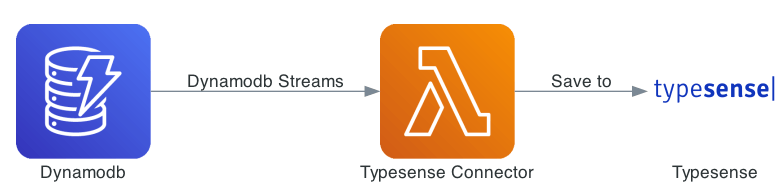
Typesense can provide fast text search when it is enabled in the deployment.
Use Typesense-backed search when you need:
- Text search through the
/searchAPI - Typo-tolerant search behavior
- Fast search over indexed content and metadata
- A simpler full-text option than raw OpenSearch queries
OpenSearch
Amazon OpenSearch Service provides enhanced full-text and advanced search capabilities.
Use OpenSearch-backed search when you need:
- Full-text search through
/searchFulltext - More flexible multi-attribute search without DynamoDB composite key limitations
- Raw OpenSearch Query DSL through
/queryFulltext - Aggregations, custom filters, sorting, and advanced ranking behavior
- Search operations over indexed document content, tags, attributes, and metadata
OpenSearch is available as an add-on module. Plan for its cost, capacity, backup, and indexing behavior separately from the core serverless FormKiQ services.
Search Capabilities
Supported Search Criteria
The available criteria depend on the endpoint and backend, but common FormKiQ search patterns include:
- Search by tag key or attribute key
- Search by exact value with
eq - Search by any value in a list with
eqOr - Search by value prefix with
beginsWith - Search by string or number range
- Search within a specific list of document IDs
- Search text content when Typesense or OpenSearch is enabled
What Gets Searched
Structured search works best against metadata that was deliberately added to documents:
- Tags
- Attributes
- Folder and path metadata
- Document IDs
- Composite key fields
Full-text search works against indexed text and metadata. Depending on the deployment and document workflow, indexed text may come from:
- Plain text document content
- Extracted text from document actions
- OCR results
- Tags and attributes synchronized into the search index
- Metadata produced by mappings, rulesets, or document workflows
For OCR behavior, see Optical Character Recognition. For mapping extracted values into attributes, see Mappings.
Indexing and Reindexing
Search results depend on what has been indexed.
- DynamoDB-backed metadata search is updated when document metadata is written.
- Composite key searches require the relevant composite keys to exist in the site or classification schema.
- Full-text search requires a configured search backend and indexed text.
- OCR and full-text actions may run asynchronously, so new content may not be searchable immediately.
- Existing documents may need to be reindexed after changing schemas, composite keys, mappings, or full-text configuration.
Use POST /reindex/documents/{documentId} when a document needs to be reprocessed for a search target.
Attribute and Tag Search
Single Attribute Search
Use POST /search for most structured searches.
Search by Key
{
  "query": {
    "attribute": {
      "key": "category"
    }
  }
}
Search by Key and Value
{
  "query": {
    "attribute": {
      "key": "category",
      "eq": "person"
    }
  }
}
Search by Key Prefix
{
  "query": {
    "attribute": {
      "key": "category",
      "beginsWith": "p"
    }
  }
}
Search by Value List
{
  "query": {
    "attribute": {
      "key": "status",
      "eqOr": ["approved", "pending-review"]
    }
  }
}
Search by Number Range
{
  "query": {
    "attribute": {
      "key": "total",
      "range": {
        "start": 10,
        "end": 90,
        "type": "NUMBER"
      }
    }
  }
}
Search by String Range
{
  "query": {
    "attribute": {
      "key": "invoiceDate",
      "range": {
        "start": "2024-01-10",
        "end": "2024-01-31",
        "type": "STRING"
      }
    }
  }
}
Multiple Attribute Search
Use multiple attributes when the document schema has a composite key that matches the fields being searched.
DynamoDB-backed multiple attribute search requires composite keys. All attributes except the last search field must use eq criteria so FormKiQ can use the configured access pattern efficiently.
Multiple Keys and Values
{
  "query": {
    "attributes": [
      {
        "key": "documentType",
        "eq": "invoice"
      },
      {
        "key": "vendorId",
        "eq": "vendor-123"
      }
    ]
  }
}
Multiple Keys with Prefix
{
  "query": {
    "attributes": [
      {
        "key": "documentType",
        "eq": "invoice"
      },
      {
        "key": "invoiceNumber",
        "beginsWith": "INV-2024"
      }
    ]
  }
}
Multiple Keys with Number Range
{
  "query": {
    "attributes": [
      {
        "key": "documentType",
        "eq": "invoice"
      },
      {
        "key": "total",
        "range": {
          "start": 1000,
          "end": 9000,
          "type": "NUMBER"
        }
      }
    ]
  }
}
Multiple Keys with String Range
{
  "query": {
    "attributes": [
      {
        "key": "documentType",
        "eq": "invoice"
      },
      {
        "key": "invoiceDate",
        "range": {
          "start": "2024-01-10",
          "end": "2024-01-31",
          "type": "STRING"
        }
      }
    ]
  }
}
For schema configuration, see Schemas.
Full-text Search
Full-text search requires Typesense or OpenSearch.
Typesense Text Search
When Typesense is enabled, use POST /search with query.text.
{
  "query": {
    "text": "invoice documents"
  }
}
OpenSearch Full-text Search
When the enhanced full-text search module is installed, use POST /searchFulltext.
{
  "query": {
    "text": "invoice documents"
  }
}
OpenSearch full-text search also supports richer attribute criteria. Typed values use stringValue, numberValue, or booleanValue.
{
  "query": {
    "attributes": [
      {
        "key": "documentType",
        "eq": {
          "stringValue": "invoice"
        }
      },
      {
        "key": "approved",
        "eq": {
          "booleanValue": true
        }
      }
    ]
  }
}
Complex Search
Use POST /queryFulltext when you need direct access to OpenSearch Query DSL.
This endpoint is intended for advanced OpenSearch use cases, including Boolean queries, custom filters, sorting, aggregations, and backend-specific tuning.
Basic Match Query
{
  "query": {
    "match": {
      "content": "invoice"
    }
  }
}
Aggregation Example
Request:
{
  "query": {
    "match_all": {}
  },
  "aggs": {
    "document_types": {
      "terms": {
        "field": "documentType.keyword"
      }
    }
  }
}
Example response:
{
  "took": 3,
  "hits": {
    "total": {
      "value": 150,
      "relation": "eq"
    },
    "hits": []
  },
  "aggregations": {
    "document_types": {
      "doc_count_error_upper_bound": 0,
      "sum_other_doc_count": 0,
      "buckets": [
        {
          "key": "invoice",
          "doc_count": 57
        },
        {
          "key": "contract",
          "doc_count": 43
        }
      ]
    }
  }
}
Combined Query and Filter
{
  "query": {
    "bool": {
      "must": [
        {
          "match": {
            "content": "invoice"
          }
        }
      ],
      "filter": [
        {
          "term": {
            "status.keyword": "approved"
          }
        },
        {
          "range": {
            "amount": {
              "gte": 1000
            }
          }
        }
      ]
    }
  }
}
For complete OpenSearch query capabilities, refer to the OpenSearch Query DSL documentation.
Provider Compatibility
| Capability | DynamoDB via /search | Typesense via /search | OpenSearch via /searchFulltext or /queryFulltext |
|---|---|---|---|
| Single tag or attribute search | Yes | Indexed content only | Yes |
| Multiple tag or attribute search | Yes, with composite keys | Indexed content only | Yes |
| Text search | No | Yes, when enabled | Yes |
| Raw search-engine query DSL | No | No | Yes, through /queryFulltext |
| Aggregations | No | No | Yes, through /queryFulltext |
API Reference
| Operation | Use for |
|---|---|
POST /search | DynamoDB-backed tag and attribute search, document ID filtering, and Typesense text search when Typesense is enabled. |
POST /searchFulltext | OpenSearch-backed full-text search and more flexible multi-tag or multi-attribute search. |
POST /queryFulltext | Raw OpenSearch search requests using OpenSearch Query DSL. |
POST /documents/{documentId}/actions | Run actions such as FULLTEXT or OCR so document content can be extracted and indexed. |
POST /reindex/documents/{documentId} | Reindex an existing document after schema, composite key, mapping, or full-text configuration changes. |
Troubleshooting Search Results
If a search returns no results, check the following:
- Confirm the document exists in the same
siteIdbeing searched. - Confirm the searched tag or attribute is present on the document.
- Confirm the correct endpoint is being used for the installed backend.
- Confirm composite keys are configured before using multiple DynamoDB-backed attributes.
- Confirm OCR or full-text actions completed before searching document content.
- Confirm OpenSearch or Typesense is installed and healthy before using full-text search.
- Reindex existing documents after changing schemas, composite keys, mappings, or search configuration.